Apklausa360 vs Survio: How Do They Differ and Which Platform Should You Choose?
Both Survio and Apklausa360 allow teams to create and run surveys independently. Survio stands out for its broad survey builder, more than 100 templates and AI assistance for questionnaire creation. Apklausa360 goes further into ongoing feedback management: teams can create surveys, campaigns and entry points themselves, while responses are enriched with business context, analysed across organisational dimensions and automatically turned into topics, sentiment and signals.
If you are choosing not only for your next survey, but for how the feedback process needs to work as your organisation’s requirements grow, this difference matters more than the number of available templates.
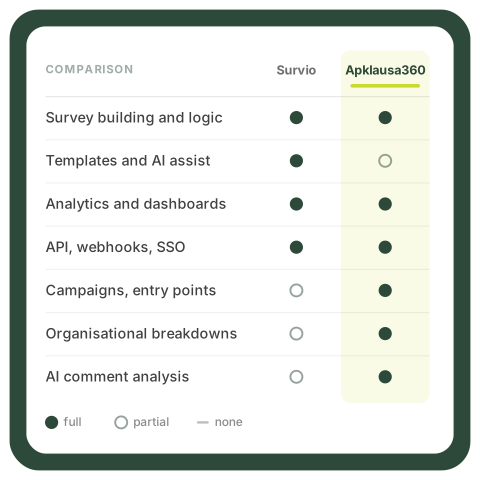
| Criterion | Survio | Apklausa360 |
|---|---|---|
| Product focus | Broad self-service survey platform | Self-managed surveys, campaigns and ongoing feedback management |
| Core strength | Fast, independent creation and delivery of many types of surveys | Ongoing feedback management: business context, organisational analytics, AI-powered comment analysis and automation |
| Scope of self-service | Self-service survey creation and delivery | End-to-end self-service — Survey Editor, campaigns, entry points, analytics and integrations |
| Survey creation | 100+ templates, AI Assistant, broad set of question types and survey logic | Survey Editor, templates, branching, piping, randomisation, multilingual surveys |
| Analytics | Filters, pivot and contingency tables, custom dashboards, automated reporting | Segmentation by organisational structure, crosstabs, role-based dashboards |
| Open-ended feedback | Text analysis tools, topic categorisation, sentiment trends | Automatic topic detection, topic-level sentiment and signals for emerging issues |
On this page:
- What can both platforms do?
- Survey creation — strong on both sides, but with different priorities
- Apklausa360 self-service goes beyond the Survey Editor
- Analytics
- Thousands of open-ended comments
- Dashboards
- Integrations
- When should you choose Survio?
- When is Apklausa360 the stronger choice?
- How should you choose?
- Frequently asked questions about Apklausa360 and Survio
Apklausa360 and Survio — what can both platforms do?
When choosing a survey or feedback platform, the natural first step is usually to compare feature lists. In this case, however, that tells you less than you might expect. A significant amount of functionality overlaps, and both platforms allow the team to manage the process independently.
| Area | Available in both platforms |
|---|---|
| Self-service | Teams can create, edit, launch and analyse surveys without vendor involvement |
| Customer experience metrics | NPS, customer satisfaction and other customer experience survey questions and templates |
| Survey creation | Ready-made templates, broad question-type support and conditional survey logic |
| Languages | Multilingual surveys and filtering results by language version |
| Respondent outreach | Links, QR codes, email and website surveys |
| Respondent context | Passing additional data together with the survey link |
| Analytics | Filters, segmentation, crosstabs and custom dashboards |
| Integrations | API, webhooks and data transfer to CRM and other internal systems |
| Administration | User roles, access rights, SSO and audit logs |
This means two things. First, both platforms can support serious B2B use cases. This is not a comparison between a free survey tool and an enterprise solution. Second, a feature checklist does not answer the most important question here, because both sides of the table contain roughly the same number of checkmarks.
The more useful question is: what is each platform optimised for beyond the basics? Survio is particularly strong at answering: “How can we create a survey quickly?” Apklausa360 answers that question too, but its value grows most when the organisation also needs to answer: “How do we continuously manage the entire feedback process and understand what the collected data says about our business?”
Survey creation — both are strong, but with different priorities
One of Survio’s core strengths is its survey builder:
- more than 100 ready-made survey templates, including customer experience templates;
- AI Assistant that can generate an entire survey structure based on a stated objective;
- AI assistance for writing questions, suggesting answer options and rephrasing copy;
- AI-generated translations for multilingual surveys;
- a broad set of question types and conditional survey logic.
Survio offers a larger ready-made template library and a highly developed AI questionnaire creation layer. That is a clear and tangible difference.
Survey creation in Apklausa360 is also fully self-service. The Survey Editor lets teams:
- create questionnaires and use templates;
- build branching and other advanced survey logic;
- use piping — reusing previous responses in later questions;
- randomise question order;
- create multilingual surveys and manage translations.
The practical conclusion is twofold. If your main criterion is the largest possible template library and AI assistance for quickly generating a questionnaire, Survio has clear strengths.
If the survey builder is only one part of a broader feedback process, Apklausa360 lets the team manage what happens before and after the survey in the same self-service environment — campaigns, entry points, organisational context, analytics and integrations.
Apklausa360 self-service goes beyond the Survey Editor
Apklausa360 can also start with a single, simple survey. The difference emerges when that survey becomes part of a continuous process.
Day-to-day use of the platform is self-service. The client can independently:
- create and edit surveys;
- build campaigns and configure campaign logic;
- create and generate entry points;
- launch different respondent outreach scenarios;
- manage multilingual versions;
- analyse results and perform crosstab analysis;
- configure dashboards;
- manage users and permissions.
This has a direct business impact. As the feedback programme expands, there is no need to contact the Apklausa360 team for every new business unit, touchpoint or campaign. The internal team can create a new survey, campaign or entry point, change questionnaire logic, add a language or adjust a dashboard itself — without turning each change into a separate vendor project.
In practice, that means faster execution, less vendor dependency, more control and easier scaling.
First survey
The team creates a questionnaire in the Survey Editor, configures the logic and launches the first NPS or CSAT measurement.
More touchpoints
A second and third customer journey touchpoint are added. New campaigns and entry points are created within the same environment.
Organisational context
Business unit, employee, location, order or customer segment data is passed together with each response.
Analytics by business dimension
Results are analysed according to the dimensions the organisation actually uses to make decisions.
Role-based dashboards
Each role — from senior management to branch managers — receives its own view with controlled access.
AI and signals
As comment volumes grow, automated topic, sentiment and emerging-issue analysis comes into play.
All of these steps can be managed by the client independently. Apklausa360’s consulting layer can help design a better measurement system, but day-to-day operation remains in the client’s hands. Expert support is an additional option rather than a requirement for using the platform.
You do not need to have a sophisticated customer experience programme from day one. You can start with a single NPS or CSAT use case and expand the same system as your needs grow, without starting again from scratch. Read more on the ongoing customer experience management page.
See how the entire feedback process can work in one platform
Show us how you currently build surveys, launch campaigns, reach respondents and analyse results. We will show you how the same process can be managed in Apklausa360 — independently, from the Survey Editor and entry points through to dashboards, AI-powered comment analysis and integrations.
Analytics — from one survey to an organisation-wide view
What Survio analytics can do
Survio analytics go well beyond basic automatic charts. The platform includes:
- charts and tables;
- individual response views;
- contingency and pivot tables;
- filters based on survey criteria;
- automatic NPS calculation;
- custom dashboards;
- link-based dashboard sharing;
- automated delivery of updated PDF reports;
- exports to Excel, CSV and PowerPoint.
This makes it possible to analyse the results of a specific survey in depth.
How the Apklausa360 analytics model differs
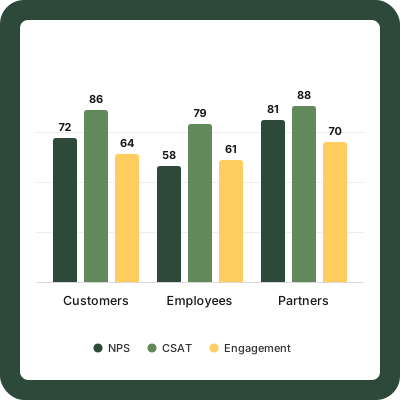
The difference is the starting point. Survio provides strong analysis of a particular survey and lets users build dashboards around it. Apklausa360 becomes particularly valuable when the analytical starting point is not a single questionnaire, but the organisation itself — its business units, employees, locations, customer segments and continuously growing feedback streams.
Results can be analysed by the dimensions the organisation actually uses to make decisions — business unit, location, employee, channel, customer segment, product or time period. Segments can be compared with one another and analysed using crosstabs.
Consider a practical example. A multi-location business measures CSAT after service interactions, NPS once a quarter and runs a separate survey after delivery. In a survey-centric model, these are three separate sets of results that a regional manager needs to review one by one. In the Apklausa360 model, they become one continuously updated view in which the same manager sees results for their region across all three feedback streams.
The manager should not need to know which survey collected the data — they need to see the performance of the area they are responsible for. As the measurement programme grows, this often determines whether results are actually used across the organisation or remain limited to the analyst’s screen.
What do you do with thousands of open-ended comments?
Numeric metrics tell you the level of performance. Open-ended comments explain the reasons behind it. The problem is that comment volumes grow faster than the time available to read them.
If you receive 50 comments per month, someone can read and group them manually. If you receive 5,000, that process no longer scales. Some feedback inevitably goes unread, and recurring problems may only become visible once they have already affected the headline metric.
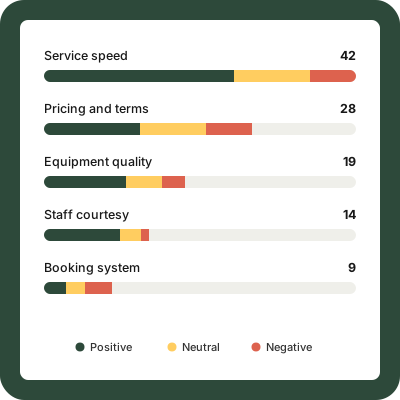
This is one of the areas Apklausa360 focuses on most strongly. Its AI works with feedback after it has been collected:
- automatically detects recurring themes;
- categorises comments, including against strategic categories defined by the organisation;
- identifies sentiment both overall and within the context of a specific theme;
- helps identify emerging problems before they materially affect the headline score;
- detects unusual changes and highlights business units or segments that stand out from the overall result.
The business benefit is concrete. The overall NPS may remain almost unchanged, while the system shows that comments about delivery times have become increasingly negative over the past few months — and identifies the location where this is happening.
Survio AI is particularly strong when creating surveys. Apklausa360 AI focuses on analysing collected feedback.
Survio’s AI layer is strongest at the questionnaire creation stage: generating questionnaires, helping formulate questions, suggesting answer options and translating surveys into other languages. Survio also provides text-analysis capabilities. Its public documentation refers to topic categorisation, recurring-word analysis, sentiment trends and word clouds.
The difference lies in where the value is concentrated. AI during survey creation saves time. AI that continuously analyses thousands of customer comments solves a different scaling problem — helping the organisation understand feedback that a human team could no longer realistically read in full.
Apklausa360’s differentiation is therefore not simply that it uses AI. Its value appears after the response is received — from topic detection and topic-level sentiment to signals about an emerging problem in a specific business unit. If your organisation receives a large and continuous volume of open-ended feedback, this layer is worth evaluating in detail rather than relying on a generic claim that a platform “analyses text”.
A dashboard for one survey or for the entire organisation?
Survio custom dashboards are created within the context of a specific survey. Users can choose which questions are displayed, apply filters, share the view through a link and schedule updated PDF versions to be sent automatically. For many use cases, this is more than sufficient.
Apklausa360 dashboards are designed around a different principle: not only for a specific survey, but for a specific organisational role. The idea is simple: not everyone in the organisation should see the same feedback view.
Senior management
Overall organisational results, KPI trends and comparisons between regions.
Regional manager
A view of their own region and comparisons between the business units they manage.
Branch manager
Only the results for their own branch and the customer comments related to it.
CX team
An organisation-wide view across all feedback streams, topic trends, AI-generated signals and the ability to drill into any segment.
The business value is specific:
- no need to prepare reports manually for each manager;
- no need to send different Excel files to different business units;
- each person always sees the current real-time result for their area;
- access is controlled by role and organisational structure.
The organisation can create and modify dashboards itself, so every new analytical view or report does not require additional development work. When a new survey is launched, the organisational structure does not need to be rebuilt — the new feedback stream can simply feed into the same role-based views.
The relevant question is therefore not whether the platform “has dashboards”. It is whether you need a good view of a specific survey, or a continuously running structure in which every role sees the part of the organisation it is responsible for.
Integrations: the important question is not whether there is an API, but how the entire feedback workflow works
Survio has a mature integration layer: API, webhooks, Zapier, additional data passed through URL parameters and real-time forwarding of new responses to other systems.
Apklausa360 provides a productised integration layer — API, webhooks, real-time events and JS SDK — combined with respondent context. This means new feedback workflows can be built on a standard technology layer instead of treating each integration as a separate development project. Surveys, campaigns and entry points within the same workflow remain self-service for the client.
| Survio | Apklausa360 |
|---|---|
| API and webhooks | API, webhooks and real-time events |
| Real-time transfer of new responses to another system | Surveys triggered by other systems based on business events |
| Additional data through URL parameters | Respondent context — business unit, employee, location, order, segment |
| Zapier and data transfer to CRM and internal systems | JS SDK for surveys inside websites and customer portals |
| Automated email invitation campaigns | Unique links, QR, NFC, email, website; SMS through integration |
In practice, a continuously running feedback workflow can look like this:
The customer completes an action
An order is completed, a service case is closed or a product is delivered in your CRM, ERP or helpdesk.
The system triggers the survey
The business event triggers the relevant Apklausa360 campaign through API or webhook. No manual intervention is required.
Context is passed along
Business unit, employee, location, order and customer segment data travel with the survey.
Feedback is collected
The respondent answers through the most appropriate entry point — a link, QR code, website or inside another system.
AI analyses the response
The comment is automatically assigned a topic and category and its sentiment is evaluated.
Dashboards update
Responsible people see the result immediately in their role-based view, without waiting for a separate report.
The signal returns to another system
A negative rating or emerging issue can be sent via webhook to the system where the next action takes place.
Both platforms include capabilities that are effectively baseline requirements in serious B2B deployments rather than unique differentiators: user roles, access rights, SSO and audit logs. Apklausa360 additionally supports Microsoft Entra ID, which can simplify identity management for organisations already using it.
The value of Apklausa360 integrations becomes most apparent when feedback needs to become a continuous part of a business process rather than a standalone questionnaire followed by exported results. In that model, the platform becomes a feedback layer connecting different organisational systems, rather than another isolated data repository.
When should you choose Survio?
Survio is a rational choice when the main requirement is the survey platform itself:
- the organisation runs many different, unrelated surveys;
- a large library of ready-made templates is important;
- AI assistance for quickly generating and translating questionnaires matters;
- many different employees or teams independently create their own surveys;
- you need a general-purpose survey SaaS covering customer, employee and market research use cases;
- reporting and dashboards based on individual surveys are sufficient.
When is Apklausa360 the stronger choice?
Apklausa360 is particularly strong when the organisation wants feedback to become an ongoing business process rather than stopping at survey creation. Importantly, this does not mean giving up self-service — the team can manage the entire system itself, from the Survey Editor to campaigns and entry points.
This usually means:
- feedback is collected across many customer journey touchpoints rather than once a year;
- multiple campaigns and entry points operate simultaneously;
- each response needs to carry respondent context such as business unit, employee, location, order or segment;
- results need to be analysed according to organisational structure rather than only inside individual surveys;
- different roles need different dashboards and controlled access;
- the organisation receives large volumes of open-ended feedback that can no longer be reviewed manually;
- AI-powered topic, category and sentiment analysis is required;
- teams need to see not only the headline metric, but also emerging problems, anomalies and business units that stand out;
- the feedback process needs to integrate with existing systems through API, webhooks or JS SDK.
You can start with a single NPS or CSAT use case. As new business units, languages, touchpoints or analytical requirements emerge, the same platform can expand with them. In practice, this is often relevant for organisations that measure NPS periodically and CSAT after specific experiences continuously, operate across several locations or business units, and want results to reach the responsible people automatically.
Apklausa360 or Survio — how should you choose?
If your main requirement is a large, general-purpose survey library and AI assistance for quickly creating many different questionnaires, Survio is well worth considering.
If you are choosing a system for the longer term and expect the process to evolve from one or two surveys into continuous feedback across many touchpoints, Apklausa360 adds a broader layer: full self-service, campaign and entry point management, organisational context, AI-powered comment analysis, role-based dashboards and real-time integrations.
In both cases, the process can be managed by your own team. The difference is how far that process can grow within the same platform.
For an organisation that wants not only to create surveys, but to manage the full feedback cycle independently, Apklausa360 should be one of the first options evaluated. If you are only beginning your comparison, it may also be useful to review how to choose a survey platform.
Frequently asked questions about Apklausa360 and Survio
Is Apklausa360 an alternative to Survio?
Yes. Apklausa360 includes a fully self-service Survey Editor, advanced logic, multilingual support, campaign management and entry points, so it can also perform the role of a traditional survey platform. The main difference becomes more visible as the process grows: Apklausa360 additionally focuses on organisational CX analytics, AI-powered analysis of large volumes of comments and integrated feedback workflows.
Can Apklausa360 be used independently without consultants?
Yes. Day-to-day platform use is self-service. The team can independently:
- create and edit surveys;
- build campaigns;
- generate entry points;
- launch respondent outreach scenarios;
- manage multilingual versions;
- analyse results;
- configure dashboards;
- manage user access.
Expert support from the Apklausa360 team is an additional option rather than a requirement.
How is Apklausa360 different from Survio?
Both platforms have strong self-service models. Survio’s strengths include a broad survey builder, more than 100 templates and AI assistance for questionnaire creation. Apklausa360 extends the same self-service principle into the broader feedback process: campaigns, entry points, linking respondent context with business data, organisational analytics, AI-powered analysis of open-ended comments and integrations. The main difference is therefore not simply the number of features, but how far the platform takes the end-to-end feedback process.
Which platform is better suited to NPS measurement?
Both support NPS. Survio provides a dedicated NPS question type, automatically calculates the score and allows users to analyse results by region or team. Apklausa360 supports NPS, CSAT, CES and custom metrics, with an architecture designed around continuous measurement — where the same NPS programme runs across multiple touchpoints, is linked to organisational context and automatically reaches the relevant managers. If you are building an ongoing process around NPS rather than running a one-off study, this distinction becomes particularly important.
Do both platforms provide API and webhooks?
Yes. Survio provides API, webhooks, Zapier integrations and the ability to pass additional data through URL parameters. Apklausa360 provides API, webhooks, real-time events and JS SDK, and surveys can be triggered by another system based on a business event while respondent context is passed at the same time. The mere existence of integrations is therefore not the key differentiator. The more important question is whether the platform lets you build the entire workflow — from the business event that triggers the survey to the signal that returns to another system.
Which platform is better for large volumes of open-ended customer feedback?
Survio provides text-analysis tools including topic categorisation, recurring-word analysis, sentiment trends and word clouds. Apklausa360 places greater emphasis on this area: it automatically detects themes, categorises comments using strategic categories defined by the organisation, identifies sentiment within the context of each topic, signals emerging issues and shows where in the organisation those issues are appearing. If the volume of comments is large and continuous, this layer can determine whether open-ended feedback is actually used.
When should you choose Survio instead of Apklausa360?
When the main requirement is the survey platform itself: the organisation runs many different, unrelated surveys, a large template library is important, AI assistance for creating surveys matters, and reports and dashboards based on individual surveys are sufficient.
See how your feedback process could work in Apklausa360
Show us how you currently build surveys, launch campaigns, reach respondents and analyse results. We will show you how your team could manage that process in Apklausa360 — from the Survey Editor and entry points to dashboards, AI analysis and integrations.
Customer Experience Management: From Feedback to Action
Learn how to turn NPS, CSAT and CES measurement into an ongoing process with automated survey distribution, organisational analytics and open-ended feedback analysis.
NPS: What It Is, How to Calculate It and How to Interpret the Score
Learn what Net Promoter Score is, how it is calculated from the percentage of Promoters and Detractors, and how to interpret a result from –100 to +100.
CSAT: What It Is and How to Calculate Customer Satisfaction Score
The CSAT formula, a calculation example, how to choose a response scale and how CSAT differs from NPS and CES.
Platform Comparison: Apklausa360, Synopticom, Opinico and Survio
A broader comparison guide covering how the four platforms differ and which questions to ask before choosing between them.